
EdenLive compute measurements on H100, MI355X and RTX PRO 6000
Compare six archived EdenLive model-loop measurements on H100, MI355X and RTX PRO 6000, with downloadable data and explicit browser-latency limits.
In Windflow's October 20, 2026 EdenLive experiment, a compiled single process generated 46.77–47.62 fps on MI355X, 24.69–24.70 fps on H100 and 17.97–18.17 fps on RTX PRO 6000, across two recorded inputs. Those are steady model-loop throughput measurements at 1280 × 704 and four denoising steps. They exclude video encoding, networking and browser display.
The experiment compares supported software stacks on the three GPUs. It does not isolate silicon performance, establish a hosted-service latency, or show that every model is faster on the same card. EdenLive is from VAST-AI; Windflow prepared the serving experiment.
Six selected measurements
| GPU and baseline attention | Cryo Crossing fps | Pulse Skirmish fps | Cryo chunk p50 / p95, ms |
|---|---|---|---|
| H100, cuDNN | 24.686 | 24.702 | 488.1 / 493.9 |
| MI355X, flash | 46.766 | 47.617 | 257.5 / 258.6 |
| RTX PRO 6000, cuDNN | 18.175 | 17.972 | 660.7 / 671.9 |
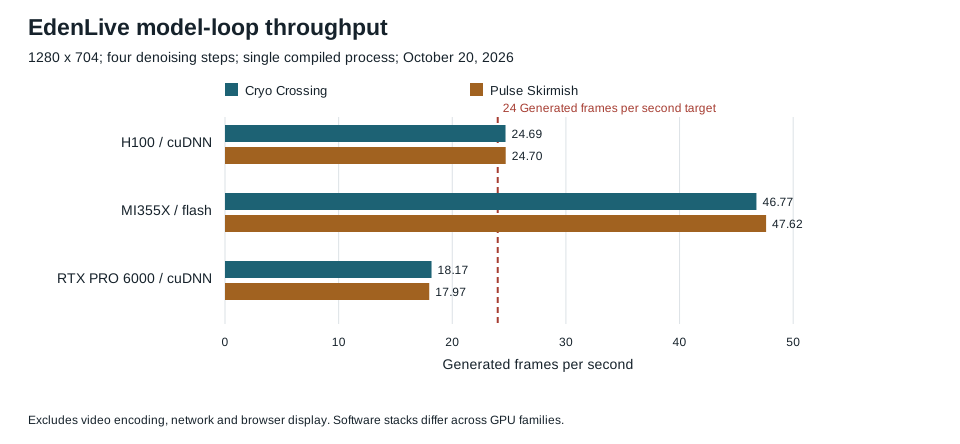
The 24 fps line is the playback target used by the experiment. H100 only narrowly exceeds it; the MI355X stack has more measured compute margin. The tested RTX stack does not produce frames quickly enough for that target. A passing compute result still needs room for encoding, delivery and operating variation before an application can promise continuous playback.
Configuration and measurement boundary
The common input configuration was:
- Upstream EdenLive commit
db55f7b1ff07c755fc60b963258e8f1a78d3b251. - Checkpoint revision
4efc2c4c33af7863f6048e36c2bceb2c30bfae97. - Pipeline
game2v-eden-world-v2-5b-taehv, four denoising steps and a fixed seed of 1234. - The bundled Cryo Crossing and Pulse Skirmish source recordings, cover images and static prompts.
- 128 chunks, producing 1533 decoded frames and 63.875 seconds of output at the 24 fps playback clock.
- The first ten main-rollout chunks excluded from steady statistics.
The measured loop includes waiting for the control encoder, diffusion generation, cache finalization, decoded RGB conversion and CPU handoff. Source frames are already available in memory. No live camera pacing, H.264 encoder, network, browser decoder or display is in this timing boundary.
The NVIDIA configurations used PyTorch 2.13.0 with CUDA 13.0 and upstream cuDNN attention. The MI355X configuration used a pinned PyTorch 2.13.0 ROCm nightly and the FlashDreams ROCm adaptation with flash attention. Framework, compiler and attention differences are part of the observed result. Fixed seeds do not imply identical output pixels across CUDA and ROCm.
What a repeatable comparison needs
- Pin the model code, weights, inference driver, input recordings and denoising configuration.
- Distinguish the first compiled startup from later runs reusing a disk cache. Do not turn a warm first chunk into a cold-start claim.
- Discard the same stated warmup region when comparing steady throughput and retain per-chunk timing.
- Count output frames, specify the playback clock and report a chunk-time tail percentile as well as average throughput.
- Add encoding, network and actual client presentation as a separate experiment before making an interactive-service claim.
These two finite recordings wrap during the output. The result is a repeated-input exercise, not a new minute-long player path. Sparse visual inspection cannot establish that a complete output has no flicker or identity drift.
Data and product interpretation
Download the six selected rows as JSON or CSV. The JSON contains the pinned configuration, scope, selected source filename and SHA-256. This extract preserves the recorded summary values; it does not include the complete per-chunk archive or constitute a fresh rerun.
Use these numbers to choose the next configuration to evaluate, then test its complete interaction loop. There is no current GPU price or hosted-session capacity conclusion in this report. Historical measurements do not establish where a session runs today.
For model inputs and access, see EdenLive on Windflow and the EdenLive API guide. The measurement guide explains the additional client measurements needed for a product decision.
FAQ
Did MI355X deliver a 47 fps EdenLive stream to a browser?
That was not measured here. The reported range is model-loop output before encoding, transport and browser display.
Does passing 24 fps prove that a configuration is ready for a live game?
No. A live game adds source capture, input response, delivery overhead and operating variation. Measure those stages and retain headroom.
Can I compare these figures directly with another provider's advertised FPS?
Only if the model revision, inputs, inference configuration and timing boundary match. Native model throughput, interpolated output and client presentation are different quantities.